Explore your Supabase database as a tree
Supabase runs on PostgreSQL, so every foreign key you define is a relationship DbTree can follow. Connect once with your database credentials, pick a table, and click through users, their records and everything linked to them.
Why use a tree explorer with Supabase
- See a user and everything that belongs to them in one view.
- Follow relationships several levels deep without writing JOINs.
- Read-only connection: no risk of editing production data by mistake.
Get your connection details
In your Supabase dashboard, open the Connect panel of your project. It shows the host, port, database name and user of your Postgres database. Use the direct connection or the session pooler; both work with a standard PostgreSQL client.
Optional: create a read-only role
DbTree never writes to your database, but a dedicated read-only role is good practice for any exploration tool:
CREATE ROLE dbtree_reader WITH LOGIN PASSWORD 'choose-a-strong-password';
GRANT USAGE ON SCHEMA public TO dbtree_reader;
GRANT SELECT ON ALL TABLES IN SCHEMA public TO dbtree_reader;
Connect and explore
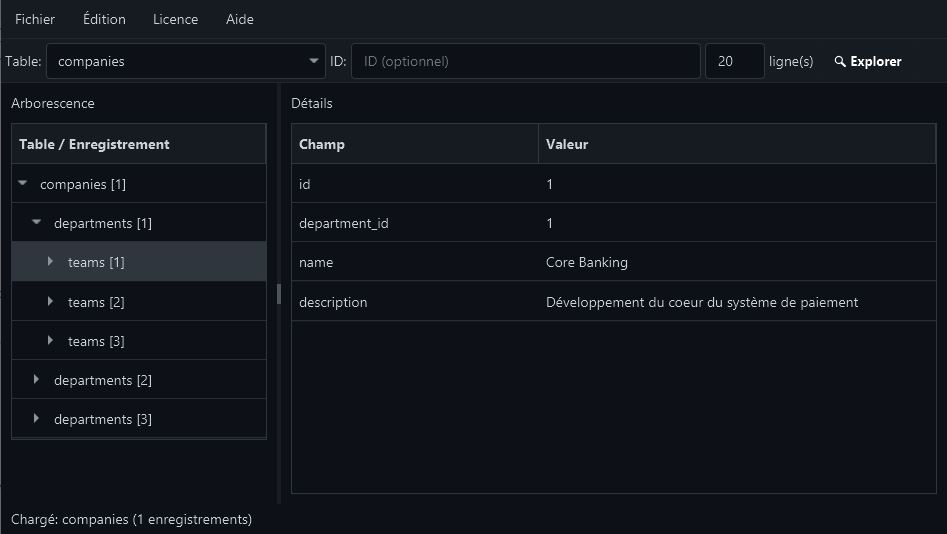
Open DbTree, create a new connection with those details, then pick a table such as profiles or orders. Enter an ID to start from a specific record, or leave it empty to list the first rows. Expand any node to load the related records.
Frequently asked questions
- Does DbTree work with Neon, Railway or Amazon RDS too?
- Yes. Any PostgreSQL 9.6+ database reachable from your machine works, including Neon, Railway and Amazon RDS.
- Are my Supabase credentials sent anywhere?
- No. Credentials are stored locally on your machine and DbTree connects directly to your database.